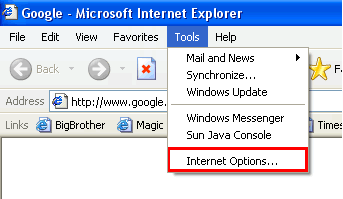
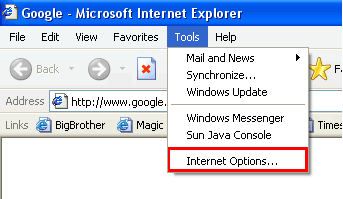
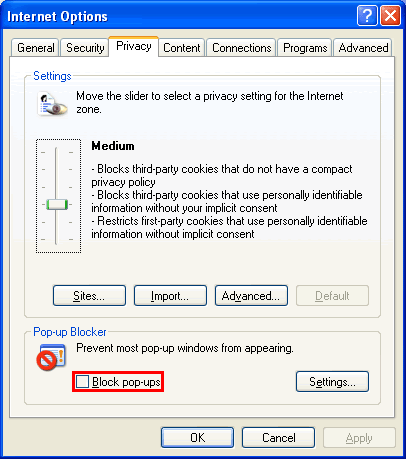
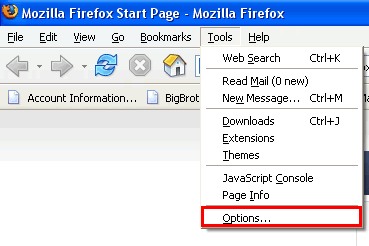
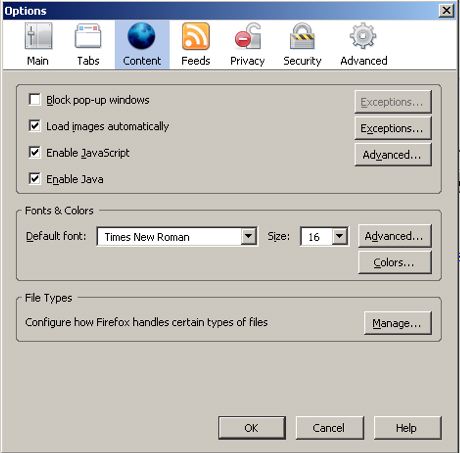
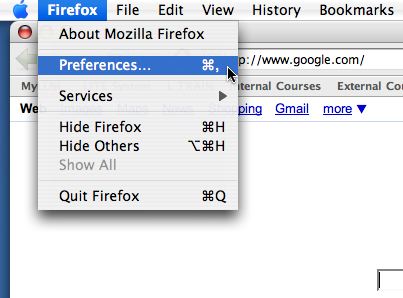
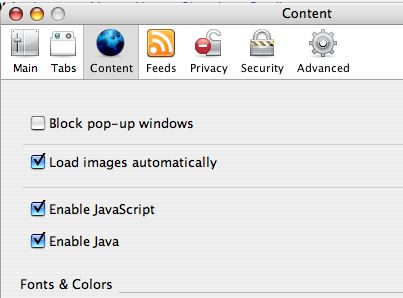
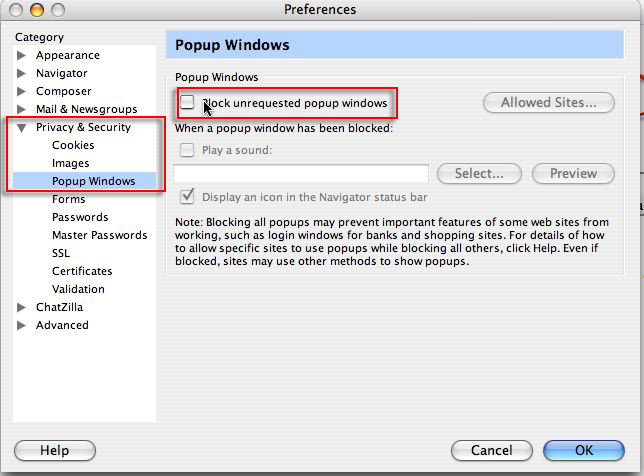
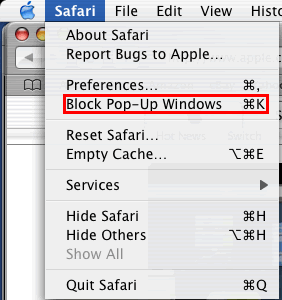
ÿþ<html> <head> <meta http-equiv="Content-Type" content="text/html; charset=iso-8859-1"> <link href="style.css" rel="stylesheet" type="text/css"> <title>How to disable popup blockers</title> <style type="text/css"> <!-- .style2 {font-size: 14px} --> </style> </head> <body> <a name="top"></a> <h1> How to disable your browser's popup blockers</h1> <p> The following includes steps for disabling pop-up window blockers.</p> <ul> <li><a href="#IE7">Internet Explorer 7 (WindowsXP)</a></li> <li><a href="#IE6">Internet Explorer6 (Windows XP)</a></li> <li><a href="#firefoxPC">Firefox (Windows PC)</a></li> <li><a href="#firefoxOSX">Firefox (Mac OSX)</a></li> <li><a href="#mozillaOSX">Mozilla (Mac OSX)</a></li> <li><a href="#safari">Safari (MacOSX)</a></li> </ul> <p> The following includes steps for disabling Brower toolbars.</p> <p> &nbsp;</p> <h3> <a name="IE7" id="IE7"></a>How to disable Internet Explorer 7 popup blocker (Windows XP) </h3> <ol> <li>From the <b>Tools</b> menu, select <b>Internet Options</b>.<br /> <img src="edpb_img/IE7_1.png" alt="Windows" width="343" height="199" border="1"><br /> &nbsp;</li> <li>From the <b>Privacy</b> tab, uncheck <b>Turn on Pop-up Blocker </b>and click <b> &quot;OK&quot;.</b><br /> <img src="edpb_img/IE7_2.png" alt="Windows" width="367" height="454" border="1"><br /> <br /> &nbsp;For more information on Internet Explorer popup blocker please go to <a target="_blank" href="http://www.microsoft.com/windowsxp/using/web/sp2_popupblocker.mspx">http://www.microsoft.com/windowsxp/using/web/sp2_popupblocker.mspx</a></li> </ol> <p> <a href="#top">Back to top</a></p> <p> &nbsp;</p> <h3> <a name="IE6" id="IE6"></a>How to disable Internet Explorer 6 popup blocker (Windows XP) </h3> <ol> <li>From the <b>Tools</b> menu, select <b>Internet Options</b>.<br /> <img src="edpb_img/IE6_1.png" alt="Windows" width="343" height="199" border="1"><br /> &nbsp;</li> <li>From the <b>Privacy</b> tab, uncheck <b>Block pop-ups</b>.<br /> <img src="edpb_img/IE6_2.png" alt="Windows" width="406" height="459" border="1"><br /> <br /> &nbsp;For more information on Internet Explorer popup blocker please go to <a target="_blank" href="http://www.microsoft.com/windowsxp/using/web/sp2_popupblocker.mspx">http://www.microsoft.com/windowsxp/using/web/sp2_popupblocker.mspx</a></li> </ol> <p> <a href="#top">Back to top</a></p> <p> &nbsp;</p> <h3> <a name="firefoxPC" id="firefoxPC"></a>How to disable the Firefox popup blocker (Windows PC)</h3> <ol> <li>From the <b>Tools</b> menu, select <b>Options</b>.<br /> <img src="edpb_img/FirefoxPC_1.png" alt="fierefox" width="369" height="246" border="1"><br /> &nbsp;</li> <li>From the <b>Content</b> tab, uncheck <b>Block Popup Windows </b>and click &quot;OK&quot;.<br /> <img src="edpb_img/FirefoxPC_2.png" alt="firefox" width="460" height="453" border="1"><br /> <br /> &nbsp;</li> </ol> <a href="#top">Back to top</a> <h3> <a name="firefoxOSX" id="firefoxOSX"></a>How to disable the Firefox popup blocker (Mac OSX)</h3> <ol> <li>From the <b>Firefox</b> menu, select <b>Preferences</b>.<br /> <img src="edpb_img/FirefoxMac_1.png" alt="fierefox" width="403" height="298" border="1"><br /> &nbsp;</li> <li>From the <b>Preferences </b>window, choose the <b>Content</b> button and then uncheck <b>Block Pop-up Windows</b>.<br /> <img src="edpb_img/FirefoxMac_2.png" alt="firefox" width="403" height="298" border="1"><br /> &nbsp;</li> </ol> <p> <a href="#top">Back to top</a></p> <p> &nbsp;</p> <h3> <a name="mozillaOSX" id="mozillaOSX"></a>How to disable the Mozilla popup blocker (Mac OSX)</h3> <ol> <li>From the <b>Mozilla</b> menu, select <b>Preferences</b>.<br /> <img src="edpb_img/MozillaMac_1.jpg" alt="safari" width="431" height="228" border="1"> </li> <li>From the <b>Privacy &amp; Security</b> tab, choose Popup Windows. Uncheck. <b>Block unrequested popup windows</b>, and click &quot;OK&quot;<br /> <img src="edpb_img/MozillaMac_2.jpg" width="644" height="476"> </li> </ol> <a href="#top">Back to top</a> <p> &nbsp;</p> <h3> <a name="safari"></a>How to disable the Safari popup blocker</h3> <ol> <li>From the <b>Safari</b> menu, make sure <b>Block Pop-Up Windows</b> is unchecked.<br /> <br /> <img src="edpb_img/Safari_1.png" alt="safari" width="282" height="300" border="1"><br /> &nbsp;</li> </ol> <p> <a href="#top">Back to top</a></p> <p> &nbsp;</p> </body> </html>